Why is my Mac so slow?
Updated 7 October 2026
Almost every slow Mac comes down to one of five things: not enough memory for what's open, one app using the processor, heat making macOS slow the chip down, a nearly full disk, or background work like Spotlight, Photos or iCloud catching up. Activity Monitor (in Applications › Utilities) tells you which in about a minute. Check them in this order.
1. Memory: is your Mac short of it?
Open Activity Monitor, choose the Memory tab and look at the Memory Pressure graph at the bottom. That graph, not the "Memory Used" figure, says whether you're short.
- Green: memory is fine. The slowness is somewhere else.
- Yellow: macOS is compressing memory to make room. Things slow down when you switch apps.
- Red: your Mac is short of memory and using the disk instead (swap). Everything feels slow.
If it's yellow or red, sort by Memory and close what you don't need, starting at the top. Browser tabs are the usual culprit. See what memory pressure means.
2. Processor: is one app hogging it?
Choose the CPU tab and sort by % CPU. An app that stays near or above 100% for minutes is your answer: quit it, or close the tab or job inside it.
If the top entry is kernel_task, the real cause is heat: macOS is holding the processor back to cool the Mac. Here's why.
Names you don't recognise, like WindowServer or mds_stores, are usually macOS. Every common process, explained.
3. Heat: is macOS slowing the chip to cool it?
A Mac that's hot to the touch, with fans loud (or, on a MacBook Air, which has no fan, simply getting slower), is being throttled. Find the app working hardest in the CPU tab, give the Mac a hard surface and clear vents, and let it cool. Fan loud or running hot goes further.
4. Disk: is it nearly full?
Open System Settings › General › Storage. With less than about 10% free, macOS has little room for swap, caches and updates, and slows down. What's taking up space, including the developer caches that grow quietly.
5. Background work: is the Mac catching up?
After a macOS update, a big file copy, a new iCloud sign-in or a large photo import, macOS has work to do: Spotlight re-indexes (mds_stores), Photos analyses your library (photoanalysisd), iCloud syncs (bird). It's temporary, often a day at most. Slow after an update.
If you write code
- Forgotten dev servers keep running after you close their terminal tab, holding memory and ports. Find and stop them.
- AI coding sessions left open in other terminals or editors each hold memory, along with the tools they started. Claude Code using too much memory.
- Local AI models sit in memory while loaded: a large one can take more than half your Mac's memory. ollama.
Still slow?
- Restart. It clears leaked memory and stuck processes in one go.
- Update macOS and your apps: slowdowns are often fixed bugs.
- If memory pressure is yellow or red every day with the apps you normally use, your Mac doesn't have enough memory for your work. Apple silicon Macs can't be upgraded, so it's a consideration for the next one.
The answer in one sentence, every time
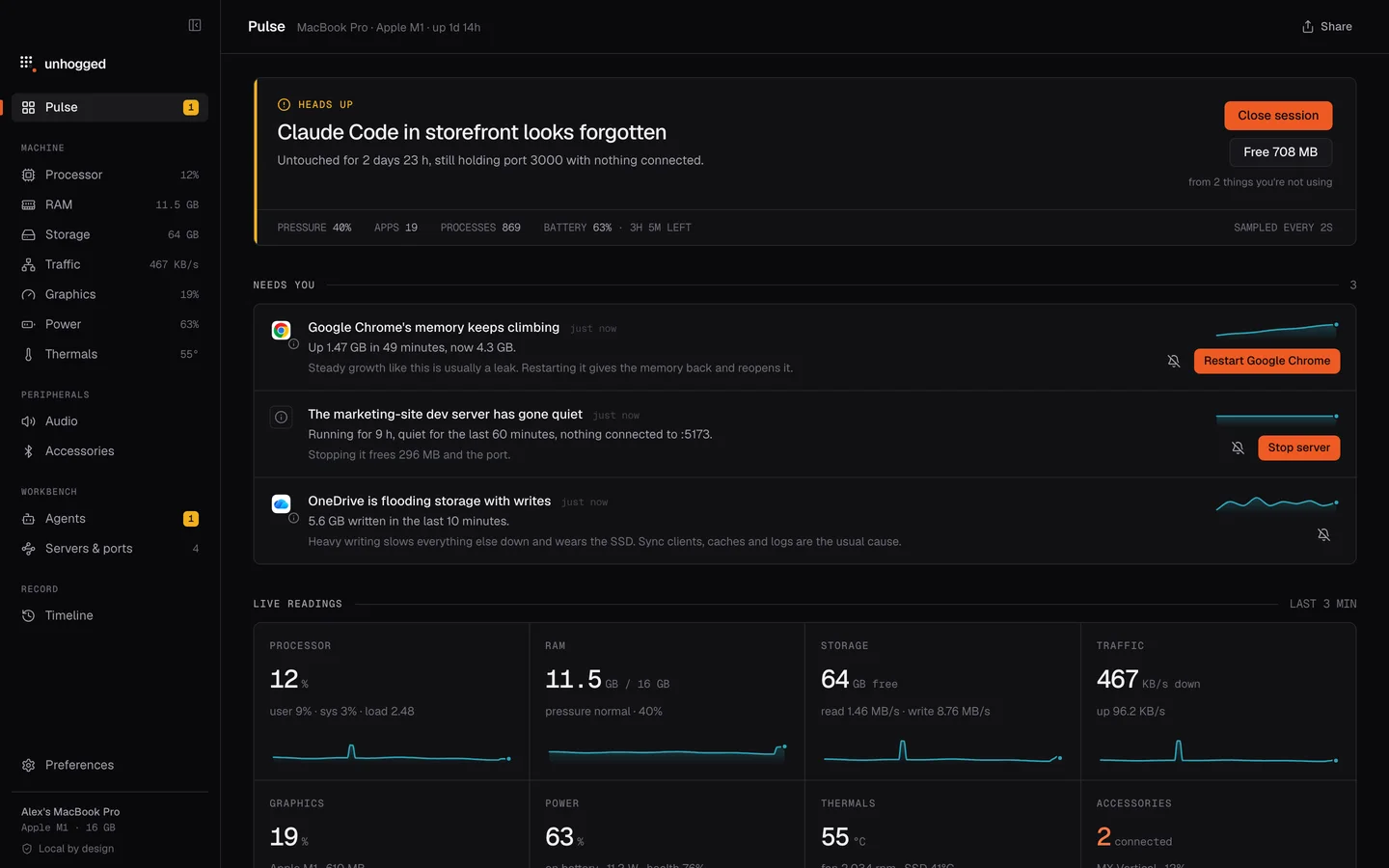
Unhogged does these five checks continuously and tells you which one it is, in a sentence, with the app to blame and one button to fix it: "Your Mac is short of memory. Chrome and Cursor hold the most." It folds 900 processes into the 60 apps they belong to and keeps 30 days of history, so you can see what was slow yesterday too.
One payment, 3 Macs. macOS 13 Ventura or later on Apple silicon.

Questions
Why is my Mac slow all of a sudden?
Usually one app has started using a lot of processor or memory, or macOS is doing background work after an update or a big change. The CPU and Memory tabs in Activity Monitor show which within a minute.
Does restarting a Mac make it faster?
Often, yes: it frees memory held by leaking apps and stops forgotten processes. If it's slow again soon after, find the app responsible rather than restarting every day.
Do Macs need cleaning apps?
Rarely. macOS manages caches and memory itself. What helps is finding the app or the full disk causing the problem, not deleting caches at random.
Related
- Memory pressure explainedMemory pressure, not Memory Used, says whether your Mac is short of memory. What green, yellow and red…
- kernel_taskmacOS itself. High CPU usually means it's holding the chip back to cool it.
- Mac fan loud or running hotA hot Mac or a loud fan means something is working the chip hard. How to find the app responsible, what's…
- Mac storage fullWhat's in System Data, where developer caches hide (Xcode, Docker, node_modules, AI models), and what's…